Appearance
RMS Open API
This document description how RMS system can integration with 99 about gas station process.
Environment Description
product domain: drvlab-api.didiglobal.com
test domain: drvlab-test.didiglobal.com
Note
please use https instead of http
Http Code Description
| http_code | description |
|---|---|
| 200 | Network request is success |
| 400 | If there are any validation issues, we will always return code 400 |
| 401 | Unauthorized |
| 403 | Permission deny |
| 404 | Url not found |
| 500 | There is an server error that was not treated in the system, And in this case it is necessary to contact 99 support team to find out the cause of the problem |
For all APIs, if an error occurs, you should try the request three times.
Http Response Field Description
| Field name | Description | Example |
|---|---|---|
| errno | Error code, when http code is 200, the errno is 0, otherwise it is an error code | 10004 |
| errmsg | Error message, when http code is 200, the message is empty, otherwise it is an error's description | sign param error |
| trace_id | 99 internal log tracking id, caller can ignore. Tell 99 about this field at the moment of troubleshooting | 0a0f120f637304feb06e4cabb166e702 |
| data | the http response body |
Errno description
| errno | Description |
|---|---|
| 10001 | Unauthorized |
| 10002 | Discount code not found |
| 10003 | Discount code was already used |
| 10004 | Discount code expired |
| 10005 | Gas station invalid |
| 10006 | Product invalid |
| 10007 | The user does not exist |
| 10008 | Product status check failed |
| 10009 | The order does not exist |
| 100010 | Order status can not cancel |
| 100011 | Order status can not complete |
| 100012 | Requests too frequently, please try again later |
| 100013 | OrderID already exist |
| 100014 | ERP does not exist |
| 100015 | ERP configuration information is incorrect |
| 100016 | ERP and gas station relation does not exist |
| 100018 | ERP and order relation does not exist |
| 100019 | ERP payment method not allow |
| 100020 | RequestId already exist |
| 100021 | cnpj format error |
| 100022 | The Order amount check fail |
| 100023 | Request params check failed |
| 100024 | Product is not listed for refueling |
| 100025 | GS CNPJ not found in 99Abastece database |
| 100026 | GS is not listed on 99Abastece |
| 100027 | The number of product rows in the order exceeds the limit |
| 100028 | The number of product exceeds the limit |
| 100029 | Company does not exist or invalid |
| 100030 | Discount code not usable at this gas station |
| 100031 | Fuel volume exceeds the limit |
| 100032 | This discount code cannot be used |
When you receive errno 10012, you need to make a request retry. For other error codes, you can contact us.
Authentication Method
Authentication Steps
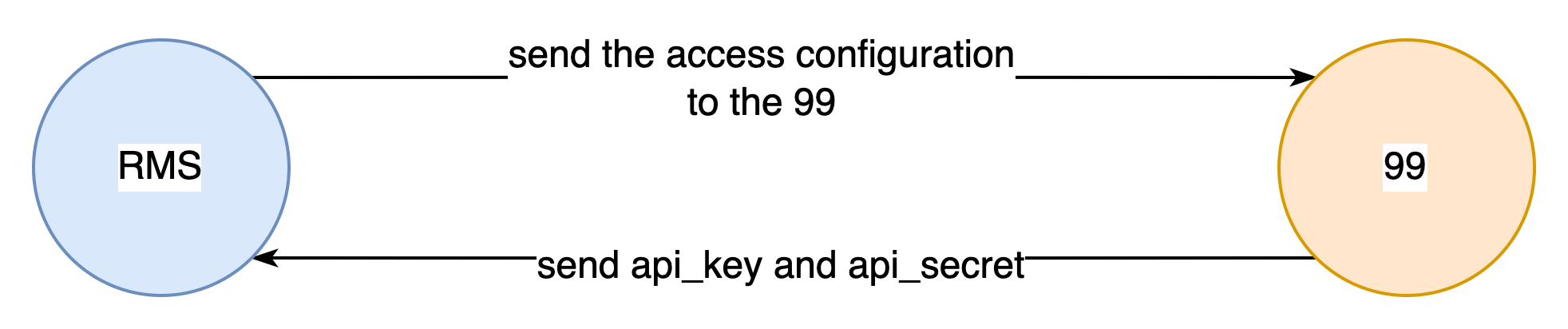
- Contact 99 team, and send access configuration to them.
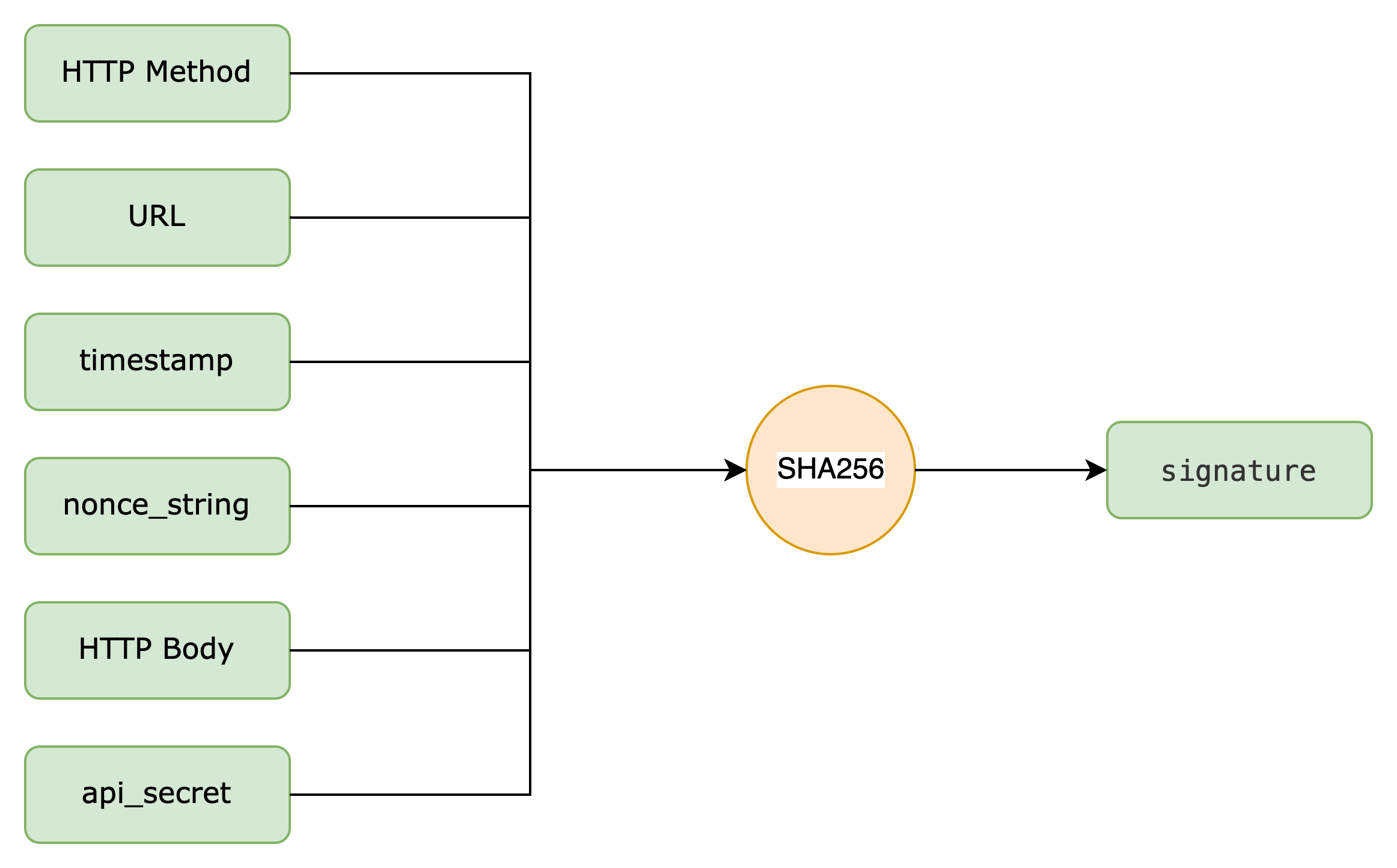
- Use the api_secret to generate authentication signature.
- Use the api_key and signature to request API.
Field Description
| Field | Description |
|---|---|
| api_key | used to identify a caller, distributed by 99 team |
| api_secret | signature secret key,should not leak to others. paired with the api_key, is used for parameter signature, distributed by 99 team |
| nonce_string | the random string, used in signature body, for example:593BEC0C930BF1AFEB40B4A08C8FB242 |
| signature | the signature string after signing all parameters according to the signature rules |
| timestamp | the current timestamp of the http request initiation, for example 1678104305 |
Token assignment
99 will assign a pair of api_key and api_secret for you, for example
json
{
  "api_key": "ZRFRHQWF",
  "api_secret": "HJBHMPNNISKGYGXP"
}
Signature rules
the caller should construct the signature string according to the signature rules below, and 99 will use the same rule to validate the signature string.
The signature body should like this(please be careful about the \n at the tail of each line):
http request method\n
URL\n
timestamp\n
nonce_string\n
http request body\n
api_secret\n
more explain:
- http request method: the upper case of http request method, eg:GET,POST,PUT and so on.
- URL:the url of the http request,should contain the params after ?.
- timestamp:the current timestamp of the http request initiation,for example 1678104305
- nonce_string:the random string, used in signature body, for example:593BEC0C930BF1AFEB40B4A08C8FB242
- http request body: the request body,for GET request, it should be empty string.otherwise,it should be the json string of http request body.for golang,use json.Marshal, for java you can try gson.
- api_secret: signature secret key
Then performing SHA256 operation on the signature body , and converting the value to uppercase.
Signature step by step
Step 1 Get the http method
GET
Step 2 Get the http url
/open/ping?param1=aaa¶m2=bbb
Step 3 Generate current timestamp
1678329955
Step 4 Generate random string
Th08TQosfSFXygWhKvdg5dSE4Oi1rlqj
Step 5 Generate http body, for this GET request, it should be empty string.
Step 6 Append the api_secret
HJBHMPNNISKGYGXP
finally, the signature body should looks like this below:
GET\n
/open/ping?param1=aaa¶m2=bbb\n
1678329955\n
Th08TQosfSFXygWhKvdg5dSE4Oi1rlqj\n
\n
HJBHMPNNISKGYGXP\n
Step 7 do SHA256 to the above signature body, we will get signature string like this:
A2CE09D789CB12167CD2B7B6FD99A2A73515CA05F01AC33377428AA2A1BD4E4F
Step 8 Set the http header like this
Authorization:auth_type|signature_info
auth_type: it should be DIDI-AUTH-SHA256 now.
signature_info: contains the json format information:
- api_key
- nonce_string
- timestamp
- signature value generate at Step 7
example:
Authorization:DIDI-AUTH-SHA256|{"api_key":"ZRFRHQWF","nonce_string":"Th08TQosfSFXygWhKvdg5dSE4Oi1rlqj","timestamp":"1678329955","signature":"A2CE09D789CB12167CD2B7B6FD99A2A73515CA05F01AC33377428AA2A1BD4E4F"}
Authentication Code Demo
Take the above sample sign generation as an example, we provide the signature code demo in postman, golang and java.
Pre-request Script Demo in postman
javascript
var crypto = require('crypto-js');
var apiKey = "your api key should be here";
var apiSecret = "your api secret should be here";

// get random string for signature
function getRandomString(length) {
    var nonceSymbols = "0123456789abcdefghijklmnopqrstuvwxyzABCDEFGHIJKLMNOPQRSTUVWXYZ";
    var symbolLen = nonceSymbols.length;
    var result = '';
    for (var i = length; i > 0; --i) {
        var radomIndex = Math.floor(Math.random() * symbolLen);
        result += nonceSymbols[radomIndex];
    }

    console.log("random string: " + result);
    return result;
}

// generate signature
function generateSignature(apiSecret, timestamp, nonceString) {
    var method = pm.request.method;
    var path = pm.request.url.getPath();
    var body = pm.request.body;

    var signatureFormat = method + '\n' + path + '\n' + timestamp + '\n' + nonceString + '\n' + body + '\n' + apiSecret + '\n';
    var signature = crypto.SHA256(signatureFormat);
    signature = signature.toString().toUpperCase();

    console.log('signatureFormat:\n' + signatureFormat);
    console.log('signature: ' + signature);
    return signature;
}

// generate authorization header
function generateHeader(apiKey, apiSecret) {
    var timestamp = parseInt(Date.now() / 1000);
    var nonceString = getRandomString(32);
    var signature = generateSignature(apiSecret, timestamp, nonceString);
    var header = 'DIDI-AUTH-SHA256|{"api_key":"' + apiKey + '","nonce_string":"' + nonceString + '","timestamp":"' + timestamp + '","signature":"' + signature + '"}';
    console.log("header: " + header);
    return header;
}

var aHeader = generateHeader(apiKey, apiSecret);

// add authorization header to reqeust
pm.request.headers.remove("Authorization");
pm.request.headers.add(
    {
        key: "Authorization",
        value: aHeader
    }
);
golang version
golang
package gist

import (
	"crypto/rand"
	"crypto/sha256"
	"encoding/hex"
	"fmt"
	"strings"
	"time"
)

const (
	NonceSymbols = "0123456789abcdefghijklmnopqrstuvwxyzABCDEFGHIJKLMNOPQRSTUVWXYZ"
	NonceLength  = 32
)

func GenerateNonce() (string, error) {
	bytes := make([]byte, NonceLength)
	_, err := rand.Read(bytes)
	if err != nil {
		return "", err
	}
	symbolsByteLength := byte(len(NonceSymbols))
	for i, b := range bytes {
		bytes[i] = NonceSymbols[b%symbolsByteLength]
	}
	return string(bytes), nil
}

func Signature() {
	apiKey := "ZRFRHQWF"
	httpMethod := "POST"
	url := "/open/rms/productSync"
	timestamp := time.Now().Unix()
	nonceString, _ := GenerateNonce() // you can use other random string method
	httpBody := `{"requestId": "41AFC51C446AD26","gasStationID": "T1704529600027","timestamp": 1701951308,"products": [{"productCode": "123","productDescription": "GASOLINA ADITIVADA","productType": "GASOLINA_ADITIVADA","status": "ATIVO","price": 5.28,"fuel": true,"ncm": "27101259","anp": "320102002"}]}`
	apiSecret := "HJBHMPNNISKGYGXP" //please replace i

	signatureFormat := fmt.Sprintf("%s\n%s\n%d\n%s\n%s\n%s\n", httpMethod, url, timestamp, nonceString, httpBody, apiSecret)
	fmt.Println(signatureFormat)

	h := sha256.New()
	h.Write([]byte(signatureFormat))
	signatureString := strings.ToUpper(hex.EncodeToString(h.Sum(nil)))
	fmt.Println(signatureString)

	authorization := fmt.Sprintf(`DIDI-AUTH-SHA256|{"api_key":"%s","nonce_string":"%s","timestamp":"%d","signature":"%s"}`,
		apiKey, nonceString, timestamp, signatureString)
	fmt.Println(authorization)
}
java version
java
import com.google.gson.Gson;
import java.io.*;
import java.nio.charset.StandardCharsets;
import java.security.MessageDigest;
import java.security.NoSuchAlgorithmException;
import java.security.SecureRandom;
import java.util.ArrayList;
import java.util.List;

public class testClient {
    protected static final String SYMBOLS = "0123456789abcdefghijklmnopqrstuvwxyzABCDEFGHIJKLMNOPQRSTUVWXYZ";
    protected static final SecureRandom RANDOM = new SecureRandom();
    public static void main(String[] args) {
        // assume req is your request object
        RequestExample req = new RequestExample();
        req.setDriverID(23);
        req.setRequestID("first_request");
        List<OrderItem> l = new ArrayList<>();
        OrderItem order1 = new OrderItem(false,1);
        OrderItem order2 = new OrderItem(true,2);
        l.add(order1);
        l.add(order2);
        req.setList(l);
        testClient testClient = new testClient();

        // build sign-message and get signature
        String signature = testClient.signature(req);

        // signature to upper
        String toUpperCase = signature.toUpperCase();
        System.out.println(toUpperCase);
    }
    public String signature(Object request) {
        Gson gson = new GsonBuilder().disableHtmlEscaping().create();
        String requestString = gson.toJson(request);
        long timestamp = generateTimestamp();
        String nonceStr = generateNonceStr();
        String httpMethod = "POST";
        String url = "/open/rms/productSync";
        String apiSecret = "adsfasdfa";
        String message = buildMessage(requestString, timestamp, nonceStr, httpMethod, url, apiSecret);
        System.out.println(message);
        return getSha256Str(message);
    }
    public String buildMessage(String requestString, long timestamp, String nonceStr, String httpMethod,String url, String apiSecret)  {

        return httpMethod + "\n"
                + url + "\n"
                + timestamp + "\n"
                + nonceStr + "\n"
                + requestString + "\n"
                + apiSecret + "\n";
    }

    public String generateNonceStr() {
        char[] nonceChars = new char[32];
        for (int index = 0; index < nonceChars.length; ++index) {
            nonceChars[index] = SYMBOLS.charAt(RANDOM.nextInt(SYMBOLS.length()));
        }
        return new String(nonceChars);
    }

    public long generateTimestamp() {
        return System.currentTimeMillis() / 1000;
    }

    public String getSha256Str(String str) {
        MessageDigest messageDigest;
        String encodeStr = "";
        try {
            messageDigest = MessageDigest.getInstance("SHA-256");
            messageDigest.update(str.getBytes(StandardCharsets.UTF_8));
            encodeStr = byte2Hex(messageDigest.digest());
        } catch (NoSuchAlgorithmException e) {
            e.printStackTrace();
        }
        return encodeStr;
    }
    //byte->string
    public String byte2Hex(byte[] bytes) {
        StringBuilder stringBuilder = new StringBuilder();
        String temp;
        for (byte aByte : bytes) {
            temp = Integer.toHexString(aByte & 0xFF);
            if (temp.length() == 1) {

                stringBuilder.append("0");
            }
            stringBuilder.append(temp);
        }
        return stringBuilder.toString();
    }
}

class RequestExample {
    private String requestID;
    private long driverID;
    private List<OrderItem> list;

    public void setDriverID(long driverID) {
        this.driverID = driverID;
    }

    public void setList(List<OrderItem> list) {
        this.list = list;
    }

    public void setRequestID(String requestID) {
        this.requestID = requestID;
    }

    public long getDriverID() {
        return driverID;
    }

    public List<OrderItem> getList() {
        return list;
    }

    public String getRequestID() {
        return requestID;
    }
}

class OrderItem implements Serializable {
    private boolean cancel;
    private int transactionItem;
    public OrderItem(boolean cancel, int tansaciton){
        this.cancel = cancel;
        this.transactionItem = tansaciton;
    }
}
Data Flow
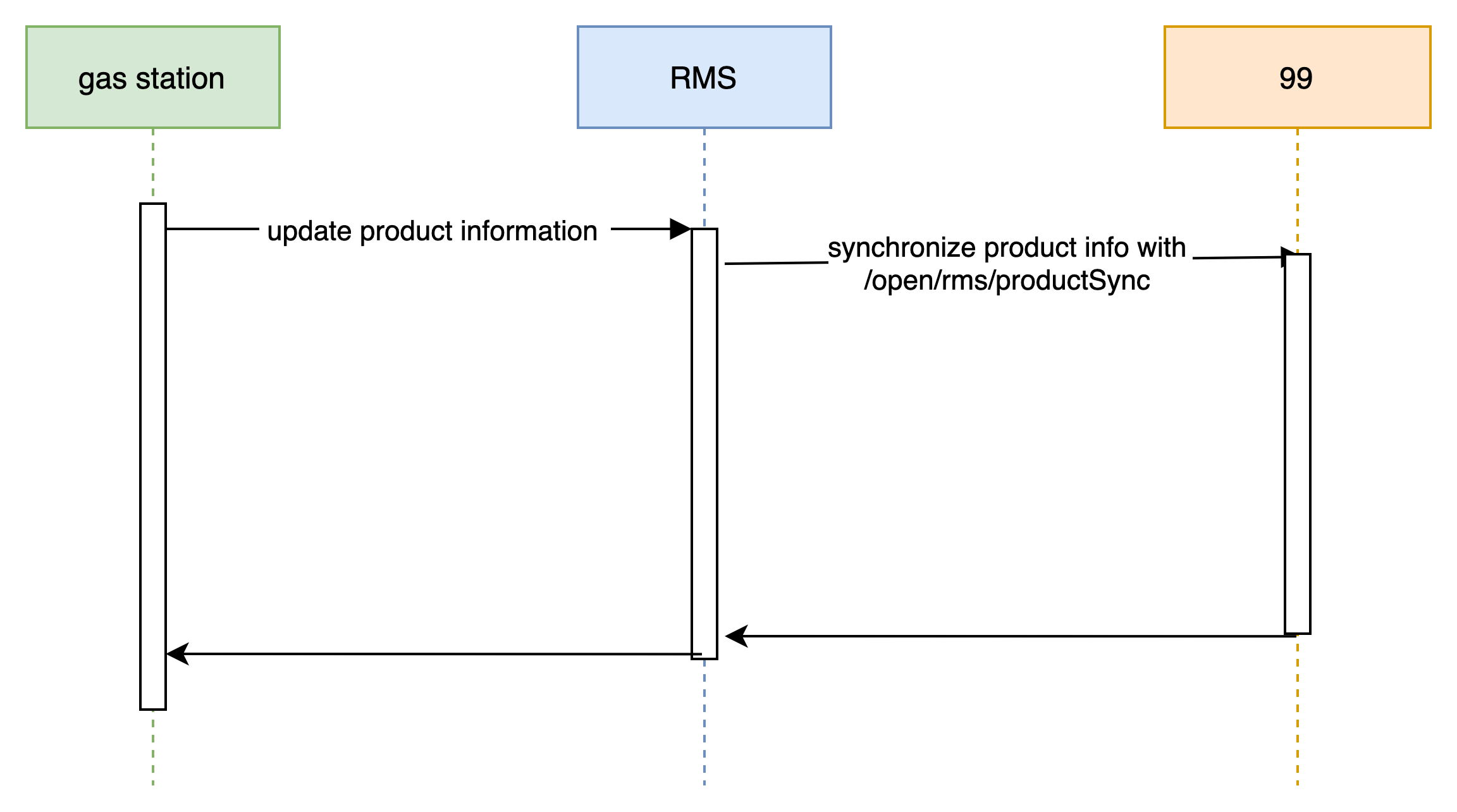
- The flow of product synchronization and price update.
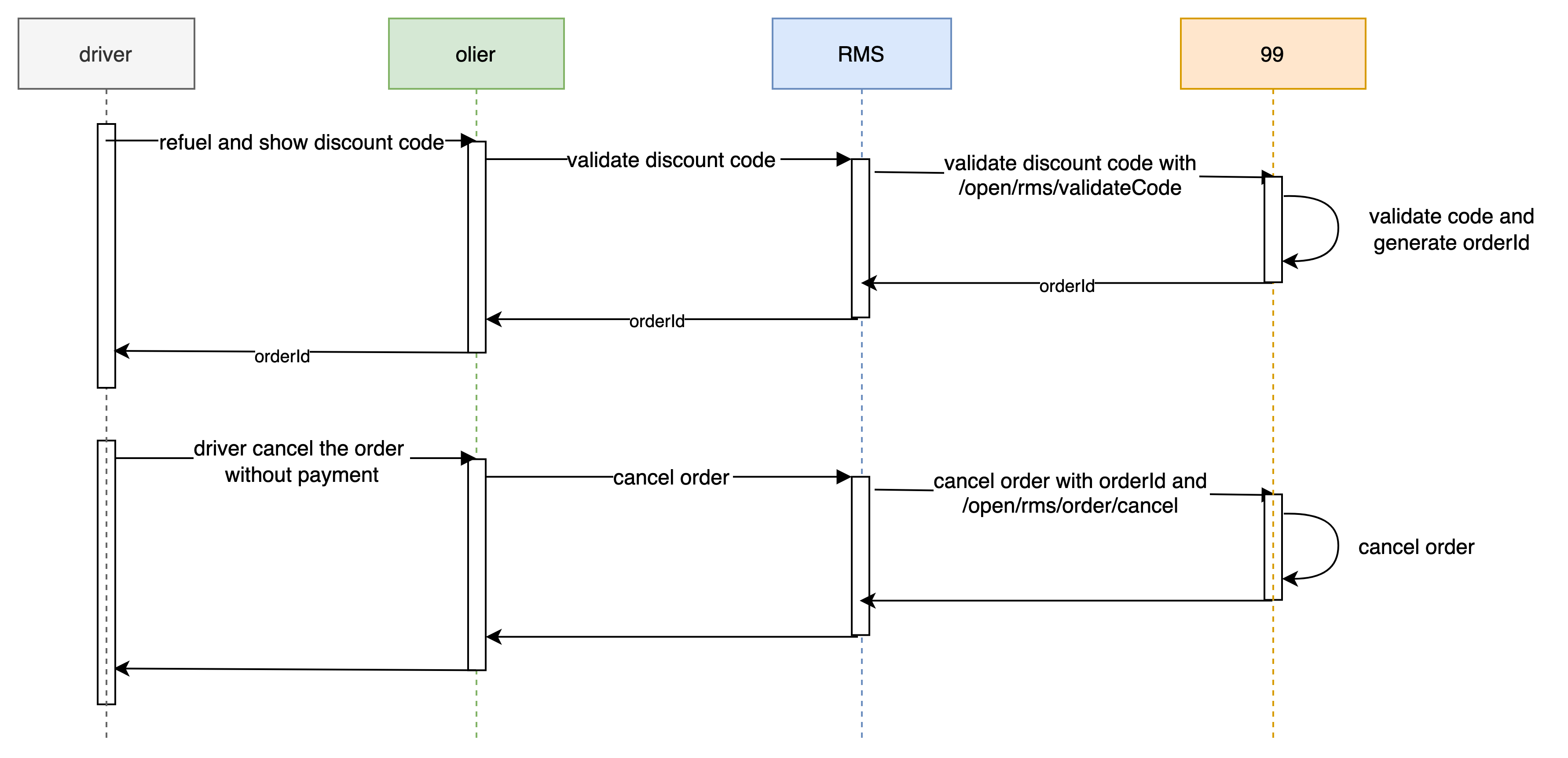
- The flow of "validate code --> payment --> cancel order"

- The flow of "validate code --> cancel order"
Testing Scenarios
When you finished the integration, you should simulate the following four scenarios and send trace_id of those request to 99 team. 99 team will confirm whether the integration is ok or not.
Scenario 1(confirm flow paymentMethod type is Pix): productSync --> validate driver discount code --> driver payment --> confirm the order
Scenario 2(confirm flow paymentMethod type is Pix): productSync --> validate driver discount code with two products --> driver payment --> confirm the order
Scenario 3(cancel flow paymentMethod type is Pix): productSync --> validate driver discount code --> driver payment --> cancel the order
Scenario 4(pre-cancel flow): productSync --> validate driver discount code --> cancel the order without payment
Scenario 5(confirm flow paymentMethod type is Dinheiro): productSync --> validate driver discount code --> driver payment --> confirm the order
Scenario 6(confirm flow paymentMethod type is Cartão de débito): productSync --> validate driver discount code --> driver payment --> confirm the order
Scenario 7(confirm flow paymentMethod type is Cartão de crédito): productSync --> validate driver discount code --> driver payment --> confirm the order
Scenario 8(confirm flow paymentMethod type is Carteiras digitais): productSync --> validate driver discount code --> driver payment --> confirm the order
Scenario 9(confirm flow paymentMethod type is Cheque): productSync --> validate driver discount code --> driver payment --> confirm the order
Scenario 10(confirm flow paymentMethod type is Cartão de débito and Cheque): productSync --> validate driver discount code --> driver payment --> confirm the order
API 1-1: (Batch) Product synchronization And Price update
Description
The function of this API is to batch synchronize the product information of a gas station including their price. If you prefer to update one product at a time, you can use the single one.
RMS System should call this API in these scene:
- 1.At the first time a gas station join with 99
In this scene, the gas station manager or RMS team will do some initialization config, so that this gas station can join
- At this time, RMS should synchronize all the product information of this gas station to 99.
- 2.When there are some products need to be updated
Anytime the gas station manager adds a product, updates a product information or changes it's price, RMS should call this API and transfer the updated information to 99.
URL: /open/rms/productSync
Request Method:POST
Content-Type: application/json
Request Traffic Limit: <= 100 QPS (request per second)
Request Parameters
| Parameter Name | Parameter Type | Parameter explanation | Necessary |
|---|---|---|---|
| requestId | string | request identifier, which is used to trace the request | Yes |
| gasStationID | string | CNPJ of gas station | Yes |
| products | array | product information,maximum array length 500 | Yes |
| timestamp | int64 | timestamp of the request | Yes |
The parameter products is of type array, and we allow a maximum of 500 product array elements for a single request
products Patameter of Request
| Parameter Name | Parameter Type | Necessary | Parameter explanation |
|---|---|---|---|
| productCode | string | Yes | product identifier from rms |
| productDescription | string | Yes | product name or description |
| productType | string | Yes | type of product, enumeration value is: ETANOL ETANOL_ADITIVADO GASOLINA GASOLINA_ADITIVADA DIESEL,DIESEL_S500_ADITIVADO DIESEL_ADITIVADO DIESEL_S10_ADITIVADO GASOLINA_PODIUM GASOLINA_PREMIUM GNV ARLA32 QUEROSENE GASOLINA_TROCA_OLEO PONTUACAO OUTRO If the product type you supplied is not in this set, you can contact 99 team to add it. Or you can provide map from product type you supplied to 99 product type |
| status | string | Yes | product status, it can either be "ATIVO" (active) or "INATIVO" (inactive) |
| price | float64 | Yes | the price of product (in reais), the precision is 2-digit |
| fuel | bool | Yes | whether the product is fuel oil or not |
| ncm | string | No | Product Mercosul Common Nomenclature |
| anp | string | No | ANP (Brazil’s Oil Agency) code |
| barcode | string | No | Product barcode |
example:
json
{
  "requestId": "73546bcc-dde9-4859-9e5d-05f3d8b0cc81",
  "gasStationID": "12345678000100",
  "timestamp": 1678923421,
  "products": [
    {
      "productCode": "123",
      "productDescription": "DIESEL",
      "productType": "Diesel S500",
      "fuel": true,
      "price": 10.02,
      "status": "ATIVO",
      "barcode": "112233",
      "ncm": "7766",
      "anp": "30303030"
    },
    {
      "productCode": "123",
      "productDescription": "DIESEL",
      "productType": "Diesel S500",
      "fuel": true,
      "price": 10.01,
      "status": "ATIVO",
      "barcode": "112233",
      "ncm": "7766",
      "anp": "30303030"
    }
  ]
}
CURL example:
you can use this piece code to generate authorization header in postman.
sh
curl --location --request POST 'https://drvlab-test.didiglobal.com/open/rms/productSync' \
--header 'Authorization: DIDI-AUTH-SHA256|{"api_key":"b5e****************5f9206d0","nonce_string":"k547x6Dhm1xfuAtQpEdfg30fZ147nEcb","timestamp":"1701173474","signature":"502D0C33CD9CBFE45F40D80888E7503F48837CE3F3F779F9162387F56D8CBD57"}' \
--header 'Content-Type: application/json' \
--data-raw '{
    "requestId": "73546bcc-dde9-4859-9e5d-05f3d8b0cc81",
    "gasStationID": "T******",
    "timestamp": 1701143941,
    "products": [
        {
          "productCode": "123",
          "productDescription": "ETANOL",
          "productType": "ETANOL",
          "fuel": true,
          "price": 4.75,
          "status": "ATIVO",
          "barcode": "112233",
          "ncm": "7766",
          "anp": "30303030"
        },
        {
          "productCode": "124",
          "productDescription": "DIESEL",
          "productType": "DIESEL_S500_ADITIVADO",
          "fuel": true,
          "price": 10.0,
          "status": "INATIVO",
          "barcode": "112233",
          "ncm": "7766",
          "anp": "30303030"
        },
        {
        "productCode": "125",
        "productDescription": "Gasolina Aditivada",
        "productType": "GASOLINA_ADITIVADA",
        "fuel": true,
        "price": 3.75,
        "status": "ATIVO",
        "barcode": "112234",
        "ncm": "7765",
        "anp": "30303031"
        },
        {
        "productCode": "126",
        "productDescription": "Gasolina Aditivada",
        "productType": "GASOLINA_ADITIVADA",
        "fuel": true,
        "price": 3.85,
        "status": "INATIVO",
        "barcode": "112234",
        "ncm": "7765",
        "anp": "303"
        }
    ]
}'
Response Parameters
| Parameter Name | Parameter Type | Parameter explanation | example |
|---|---|---|---|
| errmsg | string | Error prompt. When the http code is 200, this field is blank, otherwise it is an error prompt | sign param error |
| trace_id | string | 99 internal log tracking id, which can be ignored by the caller. Always inform 99 of this field when troubleshooting problems | 0a0f120f637304feb06e4cabb166e702 |
| data | object | API specific response content |
Data Object Parameters
| Parameter Name | Parameter Type | Parameter explanation | example |
|---|---|---|---|
| requestId | string | identifier of the request, used for tracing the request | d290f1ee-6c54-4b01-90e6-d701748f0851 |
Response Example
Return Success (Status: 200)
json
{
  "data": {
    "requestId": "3b146f42-180e-4bc1-960f-8efe907e9198"
  },
  "errmsg": "success",
  "trace_id": "0a0f163b623b0de5759f6f9e066c9f02"
}
Return Error (Status: 400)
json
{
  "data": {
    "requestId": "3b146f42-180e-4bc1-960f-8efe907e9198"
  },
  "errmsg": "specified error message",
  "trace_id": "0a0f163b623b0de5759f6f9e066c9f02"
}
API 1-2: (Single) Product synchronization And Price update
Description
The function of this API is to synchronize single product information of a gas station including their price. If you prefer to update many products at a time, you can use the batch one.
RMS System should call this api in these scene:
- 1.At the first time a gas station join with 99
In this scene, the gas station manager or RMS team will do some initialization config, so that this gas station can join
- At this time, RMS should synchronize all the product info of this gas station to 99 with this API.
- 2.When there are some products need to be updated
Anytime the gas station manager adds a product, updates a product info or changes it's price, RMS should call this API and transfer the updated info to 99.
URL: /open/rms/singleProductSync
Request Method:POST
Content-Type: application/json
Request Traffic Limit: <= 100 QPS (request per second)
Request Parameters
| Parameter Name | Parameter Type | Parameter explanation | Necessary |
|---|---|---|---|
| requestId | string | request identifier, which is used to trace the request | Yes |
| gasStationID | string | CNPJ of gas station | Yes |
| timestamp | int64 | timestamp of the request | Yes |
| productCode | string | product identifier from rms | Yes |
| productDescription | string | product name or description | Yes |
| productType | string | type of product, enumeration value is: ETANOL ETANOL_ADITIVADO GASOLINA GASOLINA_ADITIVADA DIESEL,DIESEL_S500_ADITIVADO DIESEL_ADITIVADO DIESEL_S10_ADITIVADO GASOLINA_PODIUM GASOLINA_PREMIUM GNV ARLA32 QUEROSENE GASOLINA_TROCA_OLEO PONTUACAO OUTRO If the product type you supplied is not in this set, you can contact 99 team to add it. Or you can provide map from product type you supplied to 99 product type | Yes |
| status | string | product status, it can either be "ATIVO" (active) or "INATIVO" (inactive) | Yes |
| price | float64 | the price of product (in reais), the precision is 2-digit | Yes |
| fuel | bool | whether the product is fuel oil or not | Yes |
| ncm | string | Product Mercosul Common Nomenclature | No |
| anp | string | ANP (Brazil’s Oil Agency) code | No |
| barcode | string | Product barcode | No |
example:
json
{
  "requestId": "73546bcc-dde9-4859-9e5d-05f3d8b0cc81",
  "gasStationID": "12345678000100",
  "timestamp": 167895430,
  "productCode": "123",
  "productDescription": "DIESEL",
  "productType": "Diesel S500",
  "fuel": true,
  "price": 10.02,
  "status": "ATIVO",
  "barcode": "112233",
  "ncm": "7766",
  "anp": "30303030"
}
CURL example:
you can use this piece code to generate authorization header in postman.
sh
curl --location --request POST 'https://drvlab-test.didiglobal.com/open/rms/singleProductSync' \
--header 'Authorization: DIDI-AUTH-SHA256|{"api_key":"b5e****************5f9206d0","nonce_string":"k547x6Dhm1xfuAtQpEdfg30fZ147nEcb","timestamp":"1701173474","signature":"502D0C33CD9CBFE45F40D80888E7503F48837CE3F3F779F9162387F56D8CBD57"}' \
--header 'Content-Type: application/json' \
--data-raw '{
    "requestId": "73546bcc-dde9-4859-9e5d-05f3d8b0cc81",
    "gasStationID": "T*****",
    "timestamp": 1701143941,
    "productCode": "123",
    "productDescription": "ETANOL",
    "productType": "ETANOL",
    "fuel": true,
    "price": 4.75,
    "status": "ATIVO",
    "barcode": "112233",
    "ncm": "7766",
    "anp": "30303030"
}'
Response Parameters
| Parameter Name | Parameter Type | Parameter explanation | example |
|---|---|---|---|
| errmsg | string | Error prompt. When the http code is 200, this field is blank, otherwise it is an error prompt | sign param error |
| trace_id | string | 99 internal log tracking id, which can be ignored by the caller. Always inform 99 of this field when troubleshooting problems | 0a0f120f637304feb06e4cabb166e702 |
| data | object | API specific response content |
Data Object Parameters
| Parameter Name | Parameter Type | Parameter explanation | example |
|---|---|---|---|
| requestId | string | identifier of the request, used for tracing the request | d290f1ee-6c54-4b01-90e6-d701748f0851 |
Response Example
Return Success (Status: 200)
json
{
  "data": {
    "requestId": "3b146f42-180e-4bc1-960f-8efe907e9198"
  },
  "errmsg": "success",
  "trace_id": "0a0f163b623b0de5759f6f9e066c9f02"
}
Return Error (Status: 400)
json
{
  "data": {
    "requestId": "3b146f42-180e-4bc1-960f-8efe907e9198"
  },
  "errmsg": "specified error message",
  "trace_id": "0a0f163b623b0de5759f6f9e066c9f02"
}
API 2: Discount code verification
Description
This API is called when the customer finish the refuel process, he will come to the gas station oiler and show his discount code from 99, the oiler will input this code into RMS system, and RMS System should call this API to get how many discount the customer can get. We will generate orderId to you, and you can confirm or cancel order with this orderId.
URL:/open/rms/validateCode
Request Method:POST
Content-Type: application/json
Request Traffic Limit: <= 100 QPS (request per second)
Request Parameters
| Parameter Name | Parameter Type | Parameter explanation | Necessary |
|---|---|---|---|
| requestId | string | request identifier, you must guarantee it global uniqueness | Yes |
| gasStationID | string | gas station cnpj | Yes |
| attendantName | string | The gas station attendant's name | Yes |
| discountCode | string | the discount code | Yes |
| totalOrderAmount | float64 | total sales amount, the precision is 2-digit | Yes |
| orderTime | int64 | The timestamp of the order generation | Yes |
| orderItemList | array | Sub order item | Yes |
| gasStationOrderId | string | The order id from gas station | No |
Order Item Parameters
| Parameter Name | Parameter Type | Parameter explanation | Necessary |
|---|---|---|---|
| productCode | string | external product identifier | Yes |
| totalAmount | float64 | total sales amount, the precision is 2-digit | Yes |
| quantity | float64 | sales quantity, the precision is 3-digit | Yes |
| unitPrice | float64 | product unit price, the precision is 2-digit | Yes |
example:
json
{
  "requestId": "d290f1ee-6c54-4b01-90e6-d701748f0851",
  "gasStationOrderId": "d290f1ee-6c54-4b01",
  "attendantName": "Barry",
  "discountCode": "TH2WBN",
  "totalOrderAmount": 1.98,
  "gasStationID": "12345678900000",
  "orderTime": 1699357865,
  "orderItemList": [
    {
      "productCode": "123456",
      "totalAmount": 1.98,
      "unitPrice": 0.16,
      "quantity": 12.356
    }
  ]
}
CURL example:
you can use this piece code to generate authorization header in postman.
sh
curl --location --request POST 'https://drvlab-test.didiglobal.com/open/rms/validateCode' \
--header 'Authorization: DIDI-AUTH-SHA256|{"api_key":"b5e****************5f9206d0","nonce_string":"k547x6Dhm1xfuAtQpEdfg30fZ147nEcb","timestamp":"1701173474","signature":"502D0C33CD9CBFE45F40D80888E7503F48837CE3F3F779F9162387F56D8CBD57"}' \
--header 'Content-Type: application/json' \
--data-raw '{
    "requestId":"062194ed-2cb3-481c-b1dd-02dc7cf4097d",
    "gasStationOrderId": "481c-b1dd-02dc7cf4097b",
    "attendantName":"*******",
    "discountCode":"9****",
    "totalOrderAmount":10.08,
    "gasStationID":"T************",
    "orderTime":1688990617,
    "orderItemList":[
        {
            "productCode": "123",
            "totalAmount": 10.08 ,
            "quantity":2,
            "unitPrice":5.04
        }
    ]
}'
Response Parameters
| Parameter Name | Parameter Type | Parameter explanation | example |
|---|---|---|---|
| errmsg | string | Error prompt. When the http code is 200, this field is blank, otherwise it is an error prompt | |
| trace_id | string | 99 internal log tracking id, which can be ignored by the caller. Always inform 99 of this field when troubleshooting problems | 0a0f120f637304feb06e4cabb166e702 |
| data | object | API specific response content |
Data Object Parameters
| Parameter Name | Parameter Type | Parameter explanation | example |
|---|---|---|---|
| orderId | string | transaction id | d290f1ee-6c54-4b01-90e6-d701748f0851 |
| totalDiscountedOrderAmount | float64 | the order amount after discount, the precision is two-digit | 1.75 |
| totalStationDiscount | float64 | total subsidy by gas station,the precision is two-digit. This field has permission restrictions. Only the ERP system with permissions can be visible.If you need permission, please contact 99. | 0.1 |
| total99Discount | float64 | total subsidy by 99,the precision is two-digit. This field has permission restrictions. Only the ERP system with permissions can be visible.If you need permission, please contact 99. | 0.13 |
| totalDiscount | float64 | the discount amount, the precision is two-digit | 0.23 |
| totalPartnerShipFee | float64 | Total amount taken by 99 | 0.23 |
| orderItems | array | Sub order item |
Order Item Response Parameters
| Parameter Name | Parameter Type | Parameter explanation | example |
|---|---|---|---|
| uuid | string | the transaction id of the sub order item | d290f1ee-6c54-4b01-90e6-d701748f0851 |
| productCode | string | external product identifier | 123 |
| stationDiscount | float64 | subsidy for this product undertaken by gas station,the precision is two-digit. This field has permission restrictions. Only the ERP system with permissions can be visible.If you need permission, please contact 99. | 0.1 |
| 99Discount | float64 | subsidy for this product undertaken by 99 ,the precision is two-digit. This field has permission restrictions. Only the ERP system with permissions can be visible.If you need permission, please contact 99. | 0.13 |
| discountAmount | float64 | total discounted price, the precision is two-digit | 0.23 |
| partnerShipFee | float64 | Amount taken by 99 | 0.23 |
example:
Return Success (Status: 200)
json
{
  "errmsg": "",
  "data": {
    "uuid": "7a4c2a05-2b2b-900d-818f-eb6b8f9daff4",
    "orderId": "7a4c2a05-2b2b-900d-818f-eb6b8f9daff4",
    "totalDiscountedOrderAmount": 269.5,
    "totalDiscount": 30,
    "totalStationDiscount": 30,
    "total99Discount": 0,
    "totalPartnerShipFee": 0,
    "orderItems": [
      {
        "uuid": "716f9887-4c0e-96b8-af40-e6f7634a7410",
        "productCode": "1",
        "discountAmount": 30,
        "stationDiscount": 30,
        "99Discount": 0,
        "partnerShipFee": 0
      }
    ]
  },
  "trace_id": "s58080b766d80edbbf2407c30eb9db02"
}
Return Error (Status: 400)
json
{
  "data": {
    "orderId": "081894fd-2cb3-481c-b1dd-02dc7cf4055b",
    "requestId": "d290f1ee-6c54-4b01-90e6-d701748f0851"
  },
  "errmsg": "specified error message",
  "trace_id": "0a0f163b623b0de5759f6f9e066c9f02"
}
API 3: Confirm Order
Description
After the driver completes their payment of the fuel order,RMS should call this api to synchronize the order info to 99.
URL:/open/rms/order/confirm
Request Method:POST
Content-Type:application/json
Request Traffic Limit: <= 100 QPS (request per second)
Request Parameters
| Parameter Name | Parameter Type | Parameter explanation | Necessary |
|---|---|---|---|
| requestId | string | request identifier, which is used to trace the request | Yes |
| orderId | string | identifier for order, which is generated by Discount code verification API | Yes |
| receipt | string | link of tax documents | No |
| orderTime | int64 | The timestamp of the order generation | Yes |
| paymentMethod | array | payment method and amount of the order | No |
paymentMethod Item Parameters of Request
| Parameter Name | Parameter Type | Parameter explanation | example |
|---|---|---|---|
| type | string | type of payment method, the enumeration value is: Pix Dinheiro Cartão de débito Cartão de crédito Carteiras digitais Cheque If the payment method you supplied is not in this set, you can contact 99 team to add it. Or you can provide map from payment method you supplied to 99 payment method | Pix |
| amount | float64 | the total amount of this payment method type, the precision is two-digit The sum of amount in the paymentMethod array must match the totalDiscountedOrderAmount value returned by API 2(Discount code verification) normally, otherwise the order cannot be completed!!! Please refer to the following wrong example for details | 50.00 |
example:
json
{
  "orderId": "3b146f42-180e-4bc1-960f-8efe907e9198",
  "requestId": "d290f1ee-6c54-4b01-90e6-d701748f0851",
  "receipt": "https://www.sefaz.rs.gov.br/NFCE/NFCECOM.aspx",
  "orderTime": 1699357865,
  "paymentMethod": [
    {
      "type": "Carteiras digitais",
      "amount": 50.00
    },
    {
      "type": "Pix",
      "amount": 50.00
    }
  ]
}
CURL example:
you can use this piece code to generate authorization header in postman.
sh
curl --location --request POST 'https://drvlab-test.didiglobal.com/open/rms/order/confirm' \
--header 'Authorization: DIDI-AUTH-SHA256|{"api_key":"b5e****************5f9206d0","nonce_string":"k547x6Dhm1xfuAtQpEdfg30fZ147nEcb","timestamp":"1701173474","signature":"502D0C33CD9CBFE45F40D80888E7503F48837CE3F3F779F9162387F56D8CBD57"}' \
--header 'Content-Type: application/json' \
--data-raw '{
    "requestId": "deeee-t5staecgs6z91r7jo-60aa5af964f58",
    "orderId": "o8yzmr63u91d7b5qq11-60aa5af965070",
    "orderTime": 1683787223,
    "receipt": "https://www.sefaz.rs.gov.br/NFCE/NFCECOM.aspx",
    "paymentMethod": [
      {
        "type": "Carteiras digitais",
        "amount": 50.00
      },
      {
        "type": "Pix",
        "amount": 50.00
      }
    ]
}'
Response Parameters
| Parameter Name | Parameter Type | Parameter explanation | example |
|---|---|---|---|
| errmsg | string | Error prompt. When the http code is 200, this field is blank, otherwise it is an error prompt | "success" |
| trace_id | string | 99 internal log tracking id, which can be ignored by the caller. Always inform 99 of this field when troubleshooting problems | 0a0f120f637304feb06e4cabb166e702 |
| data | object | API specific response content | {} |
Data Object Parameters
| Parameter Name | Parameter Type | Parameter explanation | example |
|---|---|---|---|
| orderId | string | identifier for order, used for get the specified order, and must be unique globally | 3b146f42-180e-4bc1-960f-8efe907e9198 |
| requestId | string | request identifier, which is used to trace the request | Yes |
example:
Return Success (Status: 200)
json
{
  "data": {
    "orderId": "3b146f42-180e-4bc1-960f-8efe907e9198",
    "requestId": "d290f1ee-6c54-4b01-90e6-d701748f0851"
  },
  "errmsg": "success",
  "trace_id ": "0a0f163b623b0de5759f6f9e066c9f02"
}
Return Error (Status: 400)
json
{
  "data": {
    "orderId": "3b146f42-180e-4bc1-960f-8efe907e9198",
    "requestId": "d290f1ee-6c54-4b01-90e6-d701748f0851"
  },
  "errmsg": "specified error message",
  "trace_id ": "0a0f163b623b0de5759f6f9e066c9f02"
}
Wrong example
API 2(Discount code verification) Return:
json
{
  "errmsg": "",
  "data": {
    "uuid": "f948d483-6b01-934a-87d9-f00ceabfbb50",
    "orderId": "f948d483-6b01-934a-87d9-f00ceabfbb50",
    "totalDiscountedOrderAmount": 100,
    "totalDiscount": 12,
    "orderItems": [
      {
        "uuid": "a24ed55e-a902-9768-bb72-0b6c70b53ad5",
        "productCode": "00001",
        "discountAmount": 12
      }
    ]
  },
  "trace_id": "0a0f270d665fe09799ef36690e12d302"
}
Wrong Confirm Order Request
json
{
  "orderId": "3b146f42-180e-4bc1-960f-8efe907e9198",
  "requestId": "d290f1ee-6c54-4b01-90e6-d701748f0851",
  "receipt": "https://www.sefaz.rs.gov.br/NFCE/NFCECOM.aspx",
  "orderTime": 1699357865,
  "paymentMethod": [
    {
      "type": "Carteiras digitais",
      "amount": 50.01
    },
    {
      "type": "Pix",
      "amount": 50.00
    }
  ]
}
Because totalDiscountedOrderAmount in API 2 returns 100, the sum of the amounts in the paymentMethod array should be consistent with it. However, in this example, 50.01 + 50.00 = 100.01, which is not equal to 100, so we will return an error message. The error message is as follows:
json
{
  "errmsg": "O montante do pagamento é incoerente",
  "data": {
    "uuid": "cb1bd8de-09b1-9d26-8d72-0ce560b1abe0",
    "orderId": "cb1bd8de-09b1-9d26-8d72-0ce560b1abe0",
    "requestId": "1e2610a1-9336-40dd-92f5-5bedecdf8a7e"
  },
  "trace_id": "0a9fe884665fe01d50cfc59a137f1c02"
}
API 4: Cancel Order
Description
This function is used for cancel the transaction. RMS System should call this API in these scene:
- When the customer completed code verification but not complete the payment.
- When the customer completed the payment, but he want to cancel the transaction.
URL:/open/rms/order/cancel
Request Method:POST
Content-Type:application/json
Request Traffic Limit: <= 100 QPS (request per second)
Request Parameters
| Parameter Name | Parameter Type | Parameter explanation | Necessary |
|---|---|---|---|
| requestId | string | request identifier, which is used to trace the request | Yes |
| orderId | string | identifier for order, which is generated by Discount code verification API | Yes |
| receipt | string | link of tax documents | No |
| orderTime | int64 | The timestamp of the order generation | Yes |
example:
json
{
  "orderId": "3b146f42-180e-4bc1-960f-8efe907e9198",
  "requestId": "d290f1ee-6c54-4b01-90e6-d701748f0851",
  "receipt": "https://www.sefaz.rs.gov.br/NFCE/NFCECOM.aspx",
  "orderTime": 1683787223
}
CURL example:
you can use this piece code to generate authorization header in postman.
sh
curl --location --request POST 'https://drvlab-test.didiglobal.com/open/rms/order/cancel' \
--header 'Authorization: DIDI-AUTH-SHA256|{"api_key":"b5e****************5f9206d0","nonce_string":"k547x6Dhm1xfuAtQpEdfg30fZ147nEcb","timestamp":"1701173474","signature":"502D0C33CD9CBFE45F40D80888E7503F48837CE3F3F779F9162387F56D8CBD57"}' \
--header 'Content-Type: application/json' \
--data-raw '{
    "orderId": "o8yzmr63u91d7b5qq11-60aa5af965070",
    "orderTime": 1683787223,
    "receipt": "https://www.sefaz.rs.gov.br/NFCE/NFCECOM.aspx"
}'
Response Parameters
| Parameter Name | Parameter Type | Parameter explanation | example |
|---|---|---|---|
| errmsg | string | Error prompt. When the http code is 200, this field is blank, otherwise it is an error prompt | "success" |
| trace_id | string | 99 internal log tracking id, which can be ignored by the caller. Always inform 99 of this field when troubleshooting problems | 0a0f120f637304feb06e4cabb166e702 |
| data | object | API specific response content | {} |
Data Object Parameters
| Parameter Name | Parameter Type | Parameter explanation | example |
|---|---|---|---|
| orderId | string | identifier for order, used for get the specified order, and must be unique globally | 3b146f42-180e-4bc1-960f-8efe907e9198 |
| requestId | string | request identifier, which is used to trace the request | Yes |
example:
Return Success (Status: 200)
json
{
  "data": {
    "orderId": "3b146f42-180e-4bc1-960f-8efe907e9198",
    "requestId": "d290f1ee-6c54-4b01-90e6-d701748f0851"
  },
  "errmsg": "success",
  "trace_id ": "0a0f163b623b0de5759f6f9e066c9f02"
}
Return Error (Status: 400)
json
{
  "data": {
    "orderId": "3b146f42-180e-4bc1-960f-8efe907e9198",
    "requestId": "d290f1ee-6c54-4b01-90e6-d701748f0851"
  },
  "errmsg": "specified error message",
  "trace_id ": "0a0f163b623b0de5759f6f9e066c9f02"
}
API 5: Heartbeat
Description
This function is used to detect the Availability between RMS and 99, you should request this api every 5 minutes, you don't need to be processed the error of this API
URL:/open/rms/heartbeat
Request Method:POST
Content-Type:application/json
Request Traffic Limit: <= 100 QPS (request per second)
Request Parameters
| Parameter Name | Parameter Type | Parameter explanation | Necessary |
|---|---|---|---|
| gasStationID | string | gas station cnpj | Yes |
example:
json
{
  "gasStationID": "T1404529600020"
}
CURL example:
you can use this piece code to generate authorization header in postman.
sh
curl --location 'https://drvlab-test.didiglobal.com/open/rms/heartbeat' \
--header 'Authorization: DIDI-AUTH-SHA256|{"api_key":"b5e****************5f9206d0","nonce_string":"k547x6Dhm1xfuAtQpEdfg30fZ147nEcb","timestamp":"1701173474","signature":"502D0C33CD9CBFE45F40D80888E7503F48837CE3F3F779F9162387F56D8CBD57"}' \
--header 'Content-Type: application/json' \
--data '{
    "gasStationID": "T1404529600020"
}'
Response Parameters
| Parameter Name | Parameter Type | Parameter explanation | example |
|---|---|---|---|
| errmsg | string | Error prompt. When the http code is 200, this field is blank, otherwise it is an error prompt | "success" |
| trace_id | string | 99 internal log tracking id, which can be ignored by the caller. Always inform 99 of this field when troubleshooting problems | 0a0f120f637304feb06e4cabb166e702 |
| data | object | API specific response content | {} |
example:
Return Success (Status: 200)
json
{
  "data": null,
  "errmsg": "success",
  "trace_id ": "0a0f163b623b0de5759f6f9e066c9f02"
}
Return Error (Status: 400)
json
{
  "data": null,
  "errmsg": "specified error message",
  "trace_id ": "0a0f163b623b0de5759f6f9e066c9f02"
}
API 6: Get Product Info (From RMS, Not Necessary)
Description
This function is used for getting all product information of the special gas station according to cnpj. This function should be supplied by RMS but not necessary.
URL:/open/rms/getProductInfo
Request Method:GET
Content-Type:application/json
Request Parameters
| Parameter Name | Parameter Type | Parameter explanation | Necessary |
|---|---|---|---|
| gasStationID | string | the cnpj of gas station | Yes |
| fuel | bool | fuel products or non-fuel products | Yes |
| page | number | paging number | No |
| size | number | page size | No |
example:
json
{
  "gasStationID": "12345678000100"
  "page": 1,
  "size": 10,
  "fuel": false
}
Response Parameters
| Parameter Name | Parameter Type | Parameter explanation | example |
|---|---|---|---|
| errmsg | string | Error prompt. When the http code is 200, this field is blank, otherwise it is an error prompt | "success" |
| trace_id | string | 99 internal log tracking id, which can be ignored by the caller. Always inform 99 of this field when troubleshooting problems | 0a0f120f637304feb06e4cabb166e702 |
| data | object | API specific response content | {} |
Data Object Parameters
| Parameter Name | Parameter Type | Parameter explanation | example |
|---|---|---|---|
| gasStationID | string | CNPJ of gas station | "12345678000100" |
| count | number | total count of products | "12345678000100" |
| products | array | product information |
Products Parameter of Data Parameter
| Parameter Name | Parameter Type | Parameter explanation | example |
|---|---|---|---|
| productCode | string | product identifier from rms | "698dc19d489c4e4db73e28a713eab07b" |
| productDescription | string | product name or description | "DIESEL" |
| productType | string | product type | "DIESEL_S500_ADITIVADO" |
| fuel | bool | whether the product is fuel oil or not | true |
| price | number | the price of product (in reais), the precision is 2-digit | 10.01 |
| status | string | product status, it can either be "ATIVO" (active) or "INATIVO" (inactive) | "ATIVO" |
| barcode | string | product barcode | "112233" |
| ncm | string | Product Mercosul Common Nomenclature | "7766" |
| anp | string | ANP (Brazil’s Oil Agency) code | "30303031" |
example:
Return Success (Status: 200)
json
{
  "errmsg": "success",
  "trace_id": "0a0f120f637304feb06e4cabb166e702",
  "data": {
    "gasStationID": "12345678000100",
    "count": 1000,
    "products": [
      {
        "productCode": "123",
        "productDescription": "DIESEL",
        "productType": "Diesel S500",
        "fuel": true,
        "price": 10.01,
        "status": "ATIVO",
        "barcode": "112233",
        "ncm": "7766",
        "anp": "30303030"
      },
      {
        "productCode": "123",
        "productDescription": "DIESEL",
        "productType": "Diesel S500",
        "fuel": true,
        "price": 10.01,
        "status": "ATIVO",
        "barcode": "112233",
        "ncm": "7766",
        "anp": "30303030"
      }
    ]
  }
}
Return Error (Status: 400)
json
{
  "data": null,
  "errmsg": "specified error message",
  "trace_id": "0a0f163b623b0de5759f6f9e066c9f02"
}